Comparisons
Excel, Google Sheets or Airtable for an immigration or study agency: when a CRM pays off
Almost every agency starts on a spreadsheet, and that is the right call on day one. The trouble starts later: a lead nobody called, a passport that expired before filing, a counsellor who left with the only copy of their follow-ups. Here is how to tell when the sheet has become the bottleneck.
 By the enrolmentCRM team
Published
6 min read
Contents
- The spreadsheet is a good start
- Seven signs your spreadsheet has hit its limit
- Excel, Google Sheets, Airtable and an agency CRM, side by side
- Excel and Google Sheets: the limits that matter to an agency
- Airtable: more powerful, but yours to build
- What an agency CRM changes
- How to move from spreadsheet to CRM without breaking the agency
- The bottom line
The spreadsheet is a good start
An Excel file or a Google Sheet costs nothing, opens anywhere and needs no training. For an agency starting out, with one or two counsellors and a few dozen files, it is often the right tool. Airtable adds views, forms and automations, and plenty of study and immigration agencies have built a perfectly decent system on it.
So the spreadsheet is not the problem. The problem is what it is asked to do once the agency grows: remember things for the team, route leads, track documents, warn before a deadline, show management who does what. A sheet stores rows; it does nothing on its own.
Seven signs your spreadsheet has hit its limit
If three of these sound familiar, the spreadsheet already costs you more than a CRM would.
- Facebook leads wait for an answer. Your Meta lead forms land in an export, someone copies them into the sheet, sometimes the next day. Meanwhile a prospect asking about a visa or an admission compares three agencies the same afternoon.
- Two counsellors call the same prospect. Or worse, nobody does: each thinks the other is on it. Without explicit routing, a shared sheet breeds duplicates and forgotten leads.
- Follow-ups live in people’s heads. “I’ll call her back Thursday” is written nowhere. When a counsellor is off sick or leaves, their follow-ups leave too.
- Documents arrive on WhatsApp and get lost. The bank statement is in a chat, the passport in an email, the admission letter on a laptop. Nobody knows what the file is still missing.
- A deadline slipped. A passport that expired before filing, a response window missed, a biometrics appointment forgotten. A spreadsheet can colour a cell; it does not alert the right person at the right time.
- Clients call to ask where their file stands. Several times a week. Each call takes ten minutes from a counsellor who could be moving another file forward.
- You cannot see what the team is doing. How many calls yesterday? How many files untouched for two weeks? To find out you have to ask, or rebuild a report by hand.
Excel, Google Sheets, Airtable and an agency CRM, side by side
| Excel / Google Sheets | Airtable | Agency CRM (enrolmentCRM) | |
|---|---|---|---|
| Starting cost | Free or part of your office suite | Free, then per seat | Free trial, then per module |
| Meta leads (Facebook, Instagram) | Manual import | Possible through an integration you set up | Native import, with campaign, ad set and ad |
| Routing between counsellors | By hand | Automation to build | Rules per campaign, round robin, visible workload |
| Follow-ups and reminders | None | Automations, within plan limits | A daily queue per counsellor, overdue first |
| Case documents | Scattered links and attachments | Attachment fields, capped per base | Checklist per procedure, client uploads, review |
| Deadlines | Conditional formatting | Date fields and automations | Calculated timelines (passport, response), alerts |
| Client access | Sharing the file (not advisable) | Forms or interfaces to design | Private client space, English and French |
| Permissions by role | Per file | Per base and interface | Counsellor, management, sub-agent: each their own scope |
| Team oversight | Reports to build | Dashboards to build | Calls, notes, WhatsApp, workload, targets |
Airtable and Google Sheets limits from their public pages, consulted on 25 October 2026 (sources at the end of the article).
Excel and Google Sheets: the limits that matter to an agency
The technical ceiling is rarely the issue: a Google Sheet accepts up to 20 million cells, far more than an agency will ever fill. The real limits are elsewhere.
- Nobody owns a row. An “owner” column gets filled in, or not. Nothing guarantees that a lead was assigned, let alone called.
- The file never speaks up. It does not send the follow-up, flag the passport expiring in three months, or tell management that a file has gone quiet.
- Everyone sees everything. Sharing the sheet means sharing every file, fees and passport numbers included, with every counsellor and every intern.
- History is fragile. One overwritten row, one sort that scrambles two columns, and a week of follow-up vanishes without a usable trace.
Airtable: more powerful, but yours to build
Airtable is a real step up: linked tables, kanban views, forms, automations. An organised agency can build intake, tracking and even a client portal on it. Three things deserve a look before committing.
You become the vendor of your own software. Every form, automation and interface has to be designed, tested and maintained. When the person who built the base leaves the agency, the know-how leaves with them.
Plans are capped. According to Airtable’s plan limits, a base holds at most 1,000 records on Free, 50,000 on Team and 125,000 on Business, with 1 GB, 20 GB and 100 GB of attachments per base, and 100, 25,000 or 100,000 automation runs a month. Public pricing is $20 per user per month for Team and $45 for Business, billed annually. For an agency storing passports and bank statements, attachment space fills up quickly.
The domain knowledge is not included. The stages of a study permit with a CAQ, the document list for Express Entry, the IRCC forms: all of it is yours to model, then to keep up to date when the rules change.
What an agency CRM changes
An agency CRM starts where the spreadsheet stops: it knows what a lead, a case file, a procedure, a document and a deadline are. In enrolmentCRM, that looks like this.
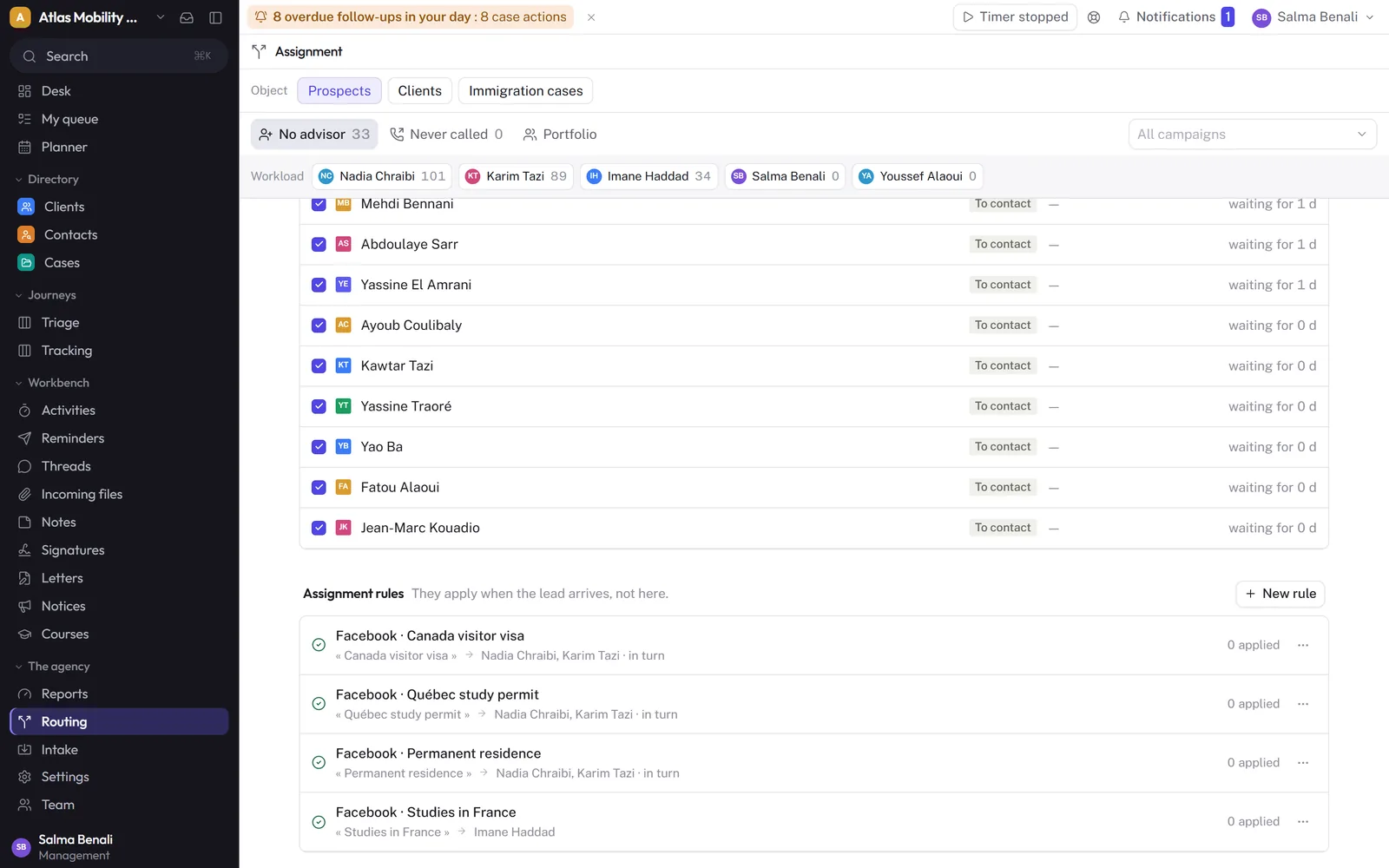
Leads arrive on their own and go to the right person. Your Meta lead forms are imported with their campaign, ad set and ad. Assignment rules per campaign send each new lead to one counsellor, or to several in turn, the moment it arrives, and everyone’s workload stays visible.
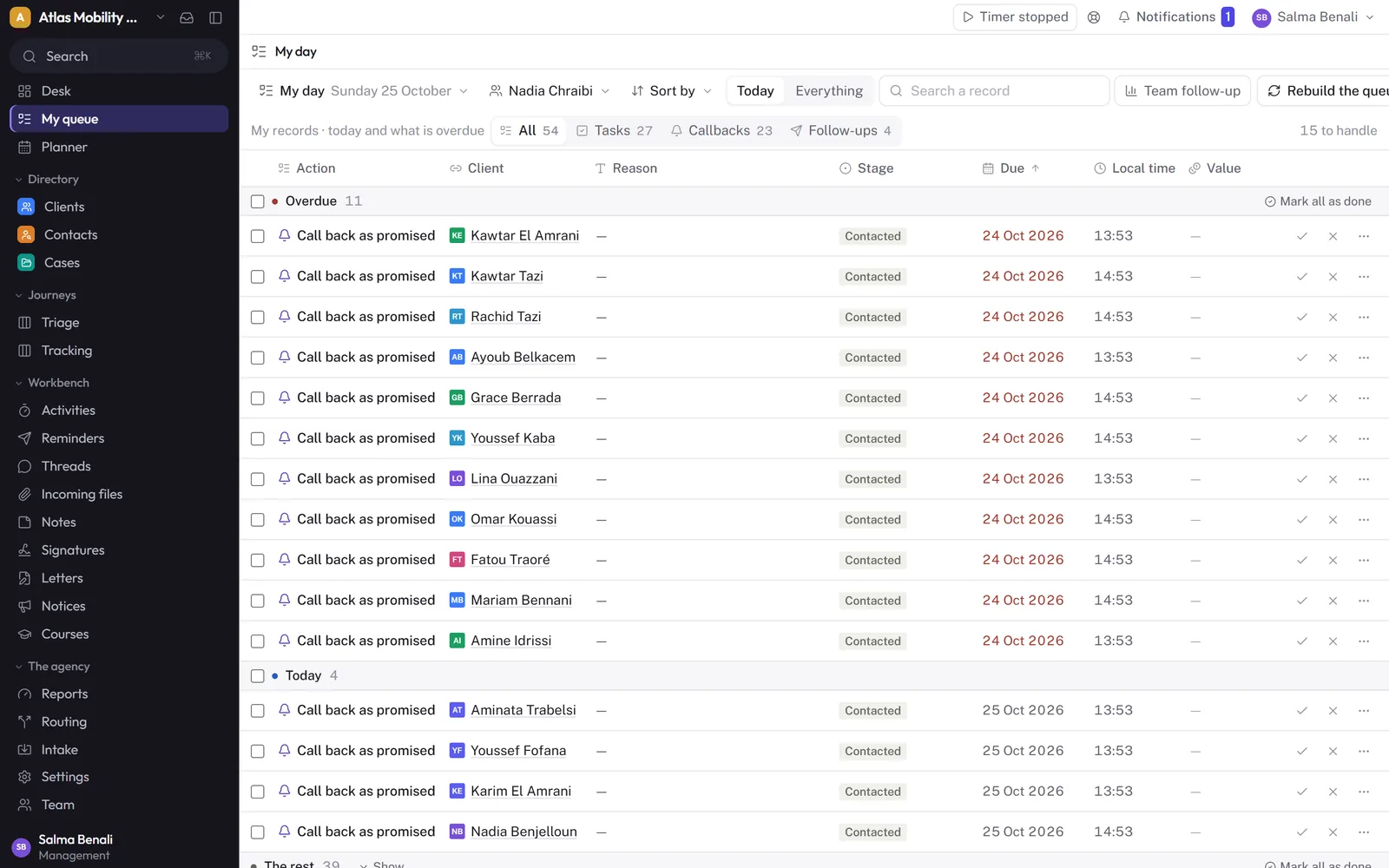
Every counsellor opens their day. Promised callbacks, follow-ups and tasks are sorted by urgency, overdue items first. Management can open any team member’s queue to see what is slipping.
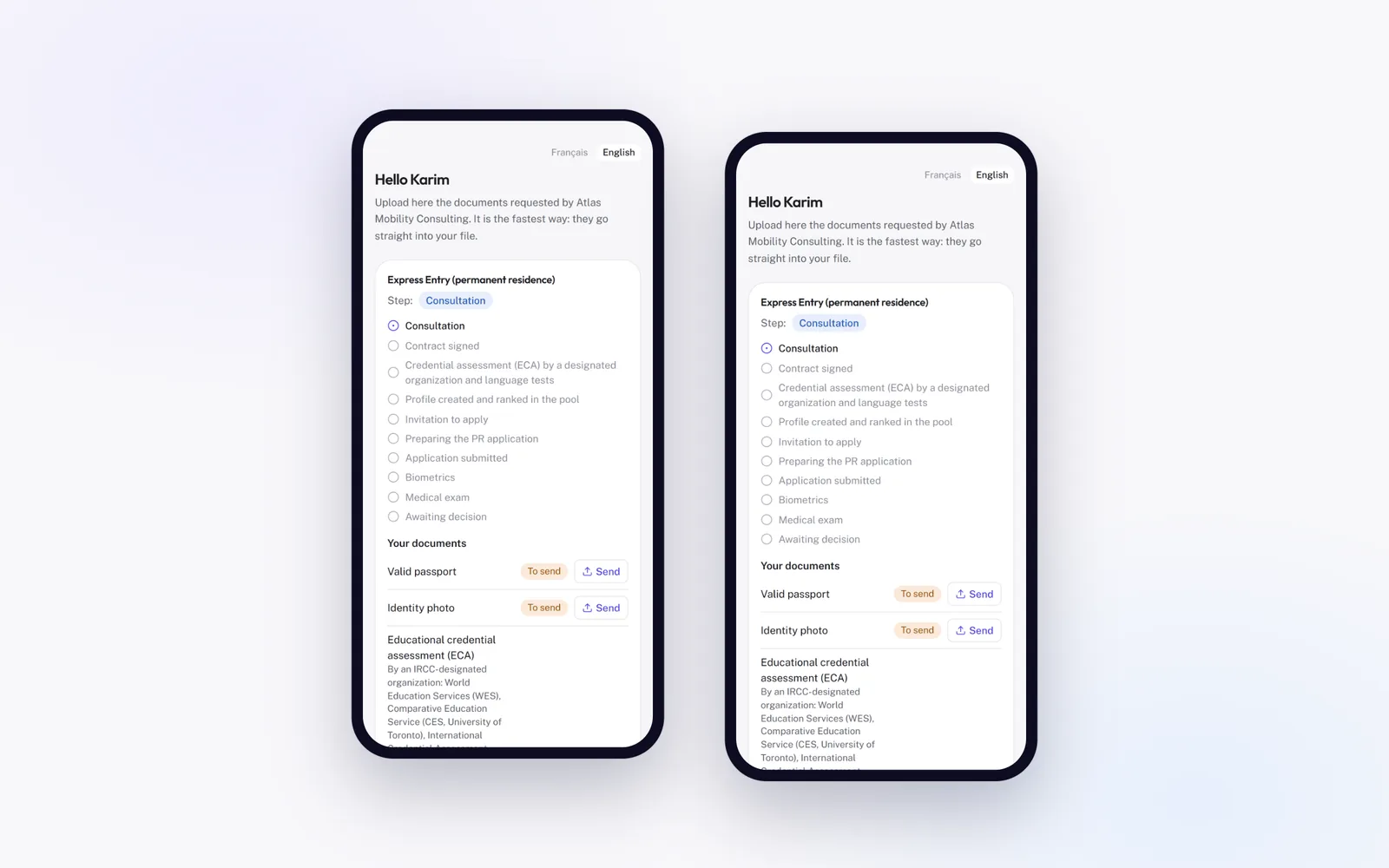
Clients follow their file and upload documents. Each client has a private space, on their phone, in English or French: they see the stage of their file, the documents requested, and send what is missing. Documents land in the case file for the counsellor to review, instead of sitting in a WhatsApp chat.
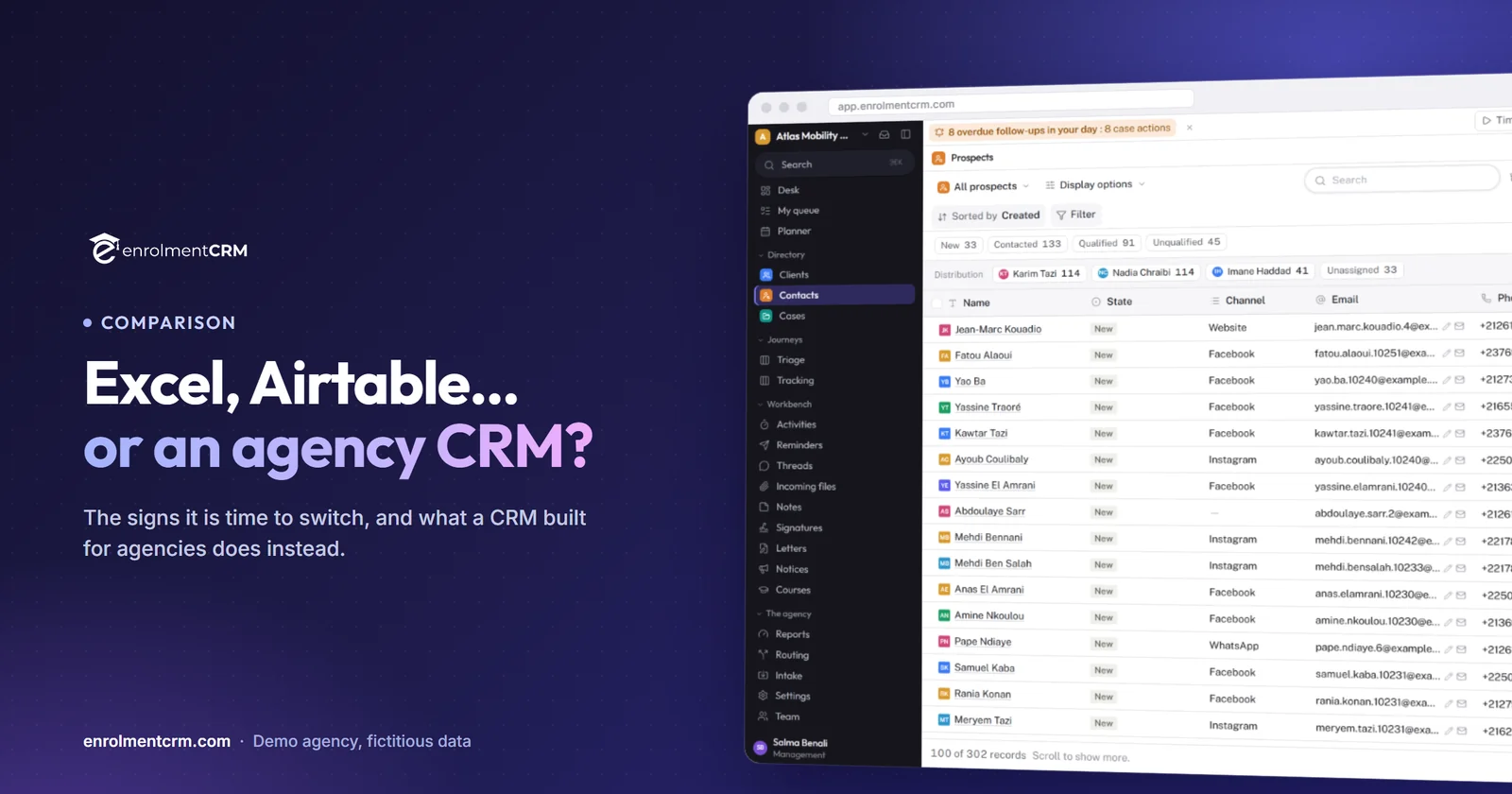
You keep the grid. It is often the team’s main worry: losing the spreadsheet view. Lists in enrolmentCRM filter, sort and edit inline like a sheet. The difference is that they know who is responsible for each row.
How to move from spreadsheet to CRM without breaking the agency
- Clean before you import. One column per piece of information, one phone format, a closed list of statuses. Whatever you do not clean now will come back as duplicates.
- Import everything at once. enrolmentCRM imports Excel files and Airtable bases, with duplicate detection on creation. The guided migration usually takes a few working days.
- Connect your campaigns the same day. New leads then flow straight into the CRM, and the spreadsheet stops being fed.
- Set a switch-over date. From that day, what is not in the CRM does not exist. Keep the old file read-only, for reference.
- Watch the first week. Unassigned leads, overdue follow-ups and files without movement tell you right away what is left to fix.
The bottom line
A spreadsheet is the right tool as long as the agency fits in one person’s head. Once several people share leads, documents arrive from everywhere and deadlines start to slip, it becomes the link that loses files. Airtable pushes the limit back, at the price of a system you build and maintain yourself. An agency CRM such as enrolmentCRM brings that domain knowledge ready-made, and keeps the grid your team already knows.
Further reading: how to choose an agency CRM in 12 criteria, or what HubSpot, Salesforce and Zoho leave you to build.
Sources
- Google, Google Sheets file size limits, consulted on 25 October 2026.
- Airtable, plans and limits and pricing, consulted on 25 October 2026.
Frequently asked questions
Can I import my Excel or Airtable base into a CRM?
Yes. enrolmentCRM imports Excel and Airtable data, with duplicate detection on creation, and the guided migration usually takes a few working days.
Is Google Sheets enough for a small immigration agency?
For one or two people with a few dozen open files, often yes. It stops being enough when several advisors share leads, when documents and deadlines must be tracked per file, or when clients need to follow their own case.
What does Airtable lack for an agency?
Nothing prevents you from building an agency system on Airtable, but you build it yourself: forms, automations, permissions, client access and IRCC-ready data. Records, attachments and automation runs are also capped per plan.
Will my team lose the spreadsheet view?
No. Lists in enrolmentCRM filter, sort and edit inline like a grid, so the team keeps its habits while the CRM handles routing, reminders and documents.