Comparisons
HubSpot, Salesforce or Zoho for an immigration consultancy: what a general CRM leaves you to build
HubSpot, Salesforce and Zoho are excellent sales tools, used by hundreds of thousands of companies. An immigration consultancy, though, does not close deals: it opens a file and carries it for months, through documents, official forms, fees and a government decision. The question is not which CRM is better, but how much of your agency you are ready to rebuild inside one.
 By the enrolmentCRM team
Published
5 min read
Contents
What general CRMs do very well
Credit where it is due. HubSpot, Salesforce and Zoho are mature platforms, used in every industry, and years ahead on many fronts:
- marketing: forms, bulk email, landing pages, campaign attribution;
- the sales pipeline: stages, probabilities, forecasts, dashboards;
- the ecosystem: hundreds of integrations, implementation partners everywhere, extensive documentation;
- customisation: custom objects, fields and automations, especially on the higher tiers.
If your firm has a marketing team, a full-time CRM admin and several very different lines of business, a general CRM can be the right foundation. For an immigration consultancy or study abroad agency of five to thirty people, the question is different: how much do you have to build before the tool really follows a case file?
A deal is not a case file
A general CRM is built around a deal: it moves from stage to stage until it is won or lost. An immigration consultancy’s work starts almost where the general CRM stops.
- The file lives on for months after signature. Building the file, checking documents, submission, biometrics, medical exam, waiting for the decision: most of the work comes after the contract.
- The stages are set by a government. Express Entry, a study permit with a CAQ, family sponsorship or a visitor visa do not share the same stages, documents or timelines. And the rules change.
- Documents make the file. Passport, bank statements, employment letter, proof of relationship: each one is requested, received, checked, and can expire.
- Several people per file. The principal applicant, the spouse, the children, sometimes a sponsor: each has their own information and forms.
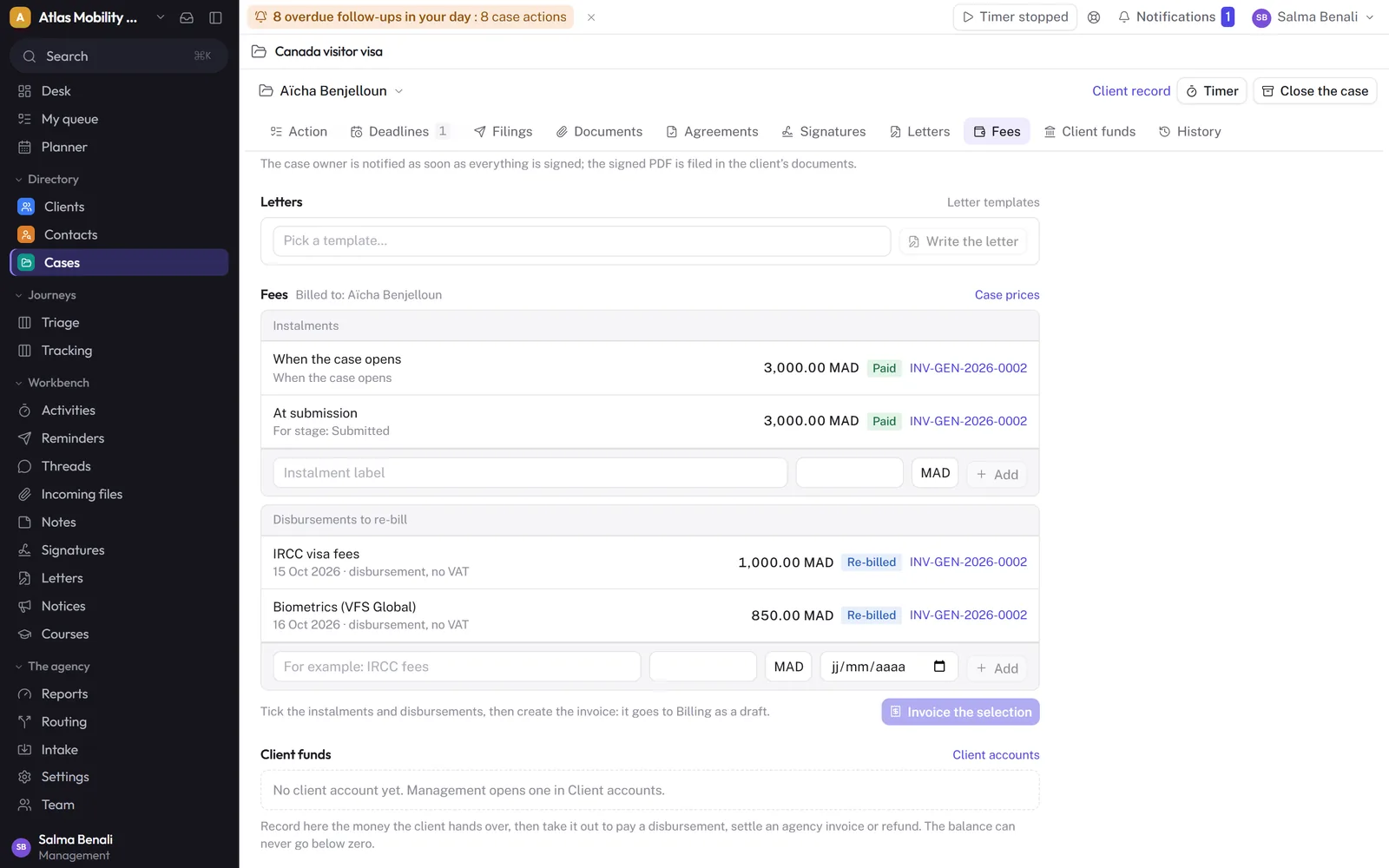
- Money follows the stages. Fees are paid in instalments tied to stages (opening, submission), government fees are re-billed, and a refusal may trigger a partial refund.
None of this is impossible in a general CRM. But all of it has to be designed.
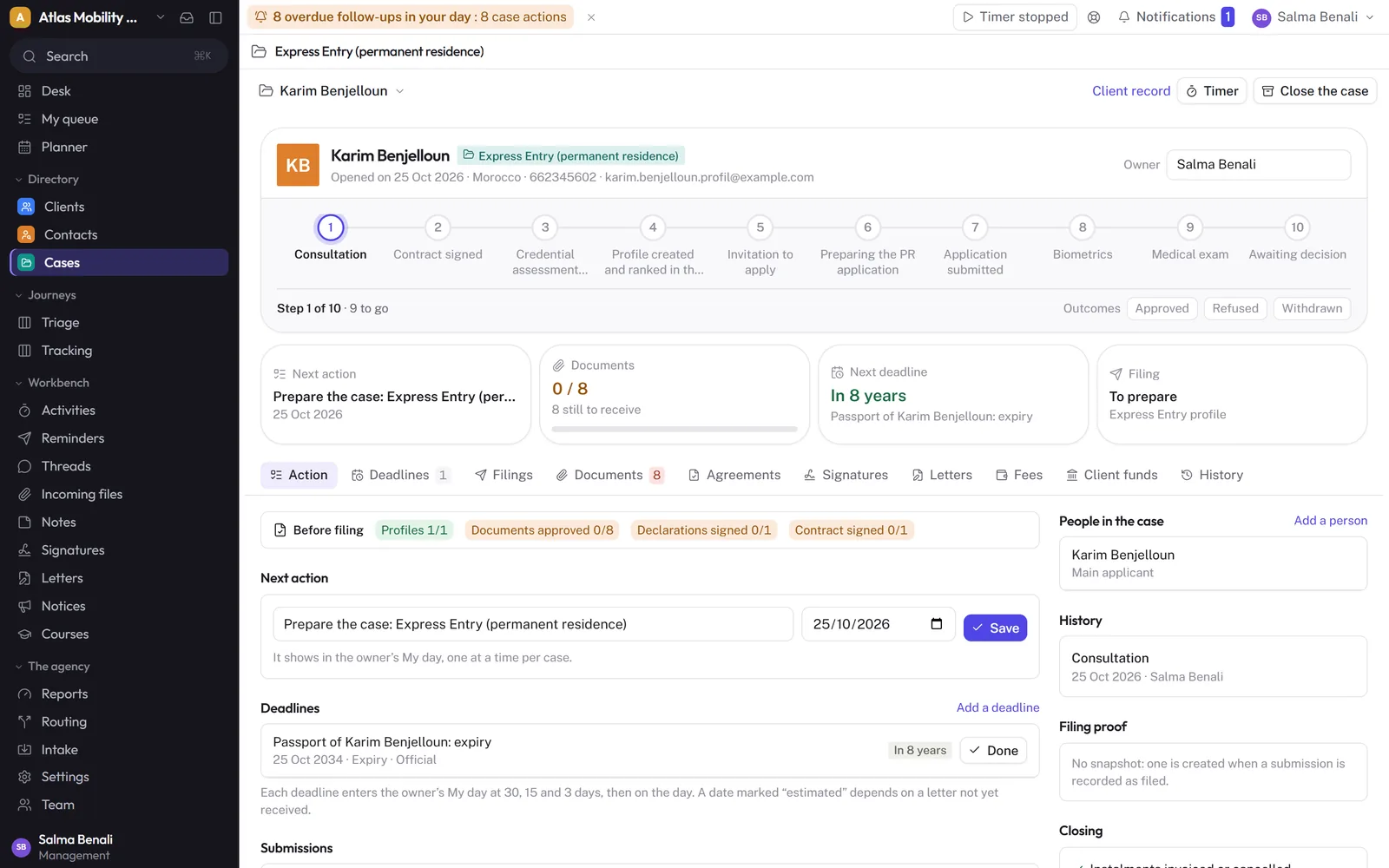
What you would build in HubSpot, Salesforce or Zoho
Here, concretely, is the list of projects a consultancy takes on when starting from a general CRM.
- A “case file” object, separate from contacts and deals, with its own fields and history.
- A workflow per procedure: visitor visa, study permit, Express Entry, sponsorship, citizenship, studies in France. Each with its stages, and rules between them (no submission without a signed contract).
- Document checklists per procedure, with the status of each document: requested, received, approved, rejected.
- Calculated deadlines: passport expiry, response windows, biometrics appointments, with alerts to the right person.
- A space where clients upload documents from their phone and follow the stage of their file, without access to the rest of the CRM.
- Official forms: as far as we know, none of the three pre-fills IRCC forms natively; it takes a third-party app or custom development.
- Fees per file: a schedule tied to stages, invoices with taxes, government fees, refunds, counsellor commissions.
- Letters and signatures: cover letter or invitation letter templates filled from the file, and a service agreement to sign.
Each item is doable. Together they make an implementation project of several weeks, then a system to maintain.
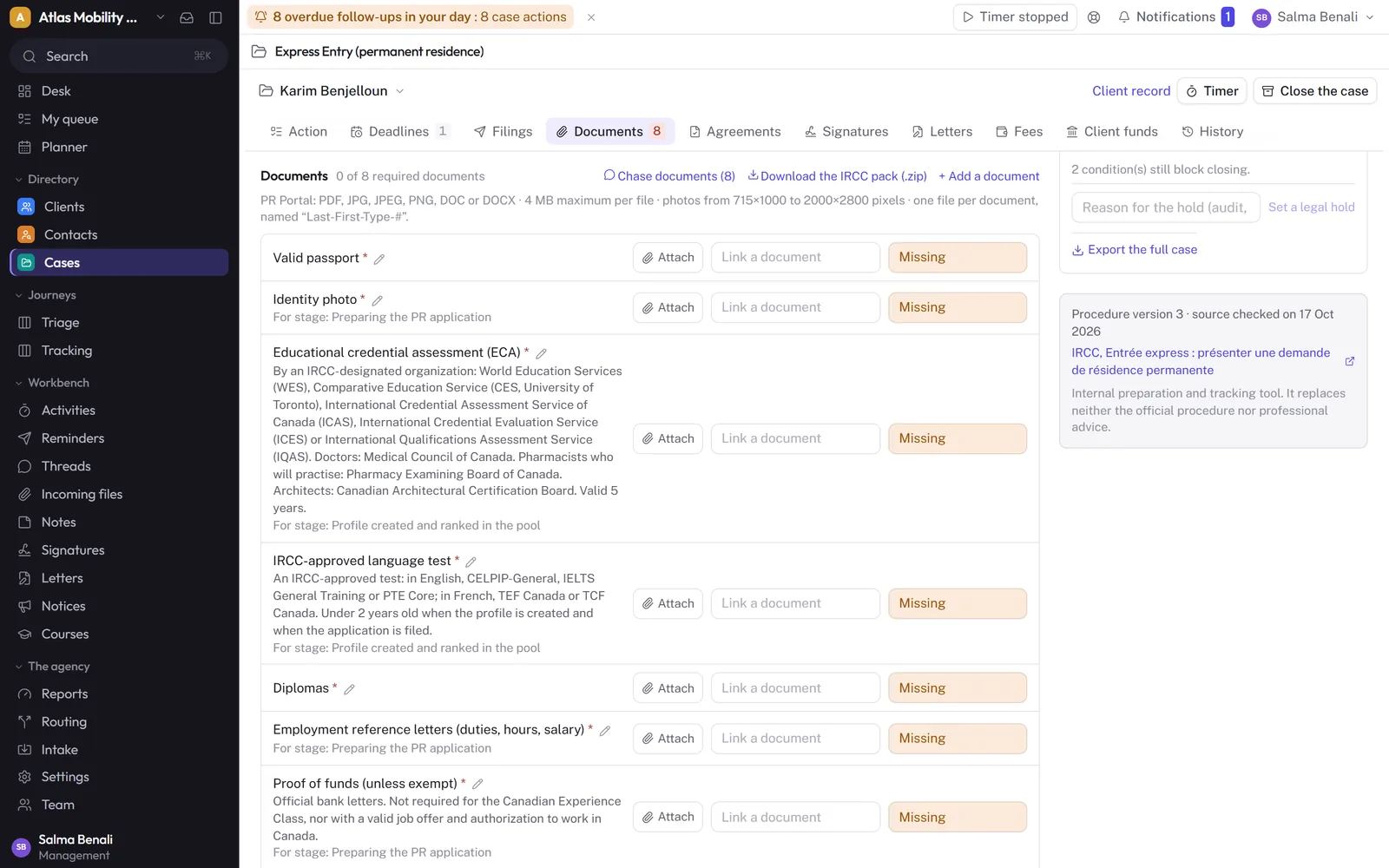
The real cost: seats, onboarding, implementation
All three vendors publish their prices, and all three charge per seat. A few reference points from their public pages on 25 October 2026:
- HubSpot: Sales Hub Professional is listed at $90 to $100 per seat per month, and the page states that this excludes the required one-time Professional Onboarding fee of $1,500 ($3,500 for Enterprise, listed at $150 per seat). A free plan covers up to two users. Source.
- Salesforce: Starter Suite at $25 per user per month, billed monthly or annually; Pro Suite at $100, and the higher editions, billed annually only. Source.
- Zoho CRM: a free edition for three users, then four editions priced per user, with up to 34% off on yearly plans. Source.
On top of the subscriptions comes what pricing pages do not show: design time, a possible implementation partner, third-party apps (forms, e-signature, client portal) and maintenance every time a procedure changes.
General CRM or specialist CRM: the comparison
| HubSpot | Salesforce | Zoho CRM | enrolmentCRM | |
|---|---|---|---|---|
| Built for | Marketing and sales, any industry | Sales and service, any industry | Sales, any industry | Immigration and study agencies |
| Immigration procedures | To configure | To configure | To configure | Ready: visitor visa, study permit and CAQ, Express Entry, sponsorship, citizenship, studies in France |
| Documents per procedure | To configure | To configure | To configure | Checklists included, status per document |
| Client document uploads | Depending on modules or third-party tool | Depending on modules or third-party tool | Depending on modules or third-party tool | Client space included, English and French |
| Pre-filled IRCC forms | Third-party tool or development | Third-party tool or development | Third-party tool or development | From the profile the client fills in |
| Staged fees, commissions | To configure | To configure | To configure | Schedule per procedure, counsellor commission |
| Pricing model | Per seat, required onboarding on Pro and Enterprise | Per seat, annual beyond Starter | Per seat, free up to 3 | Per module, 14-day trial |
| Time to go live | Weeks, depending on the project | Weeks to months, depending on the project | Weeks, depending on the project | A few days, guided migration |
“To configure”: doable with the platform’s objects, properties and automations, depending on the edition. Information from the vendors’ public pages on 25 October 2026.
When a general CRM makes sense
- Your firm has a sizeable marketing team already trained on HubSpot or Salesforce.
- You have a CRM admin, or a budget for an implementation partner, and time for a project.
- Immigration is one of several very different lines of business.
- Your processes are so specific that no specialist tool would cover them without heavy adaptation.
When a specialist CRM wins
- The agency needs to run in days, not months.
- Your leads come mostly from Facebook, Instagram and WhatsApp, and must be routed to counsellors the moment they arrive.
- You want clients to upload their documents and follow their file without calling.
- You would rather the vendor kept procedures, documents and forms up to date than do it yourself.
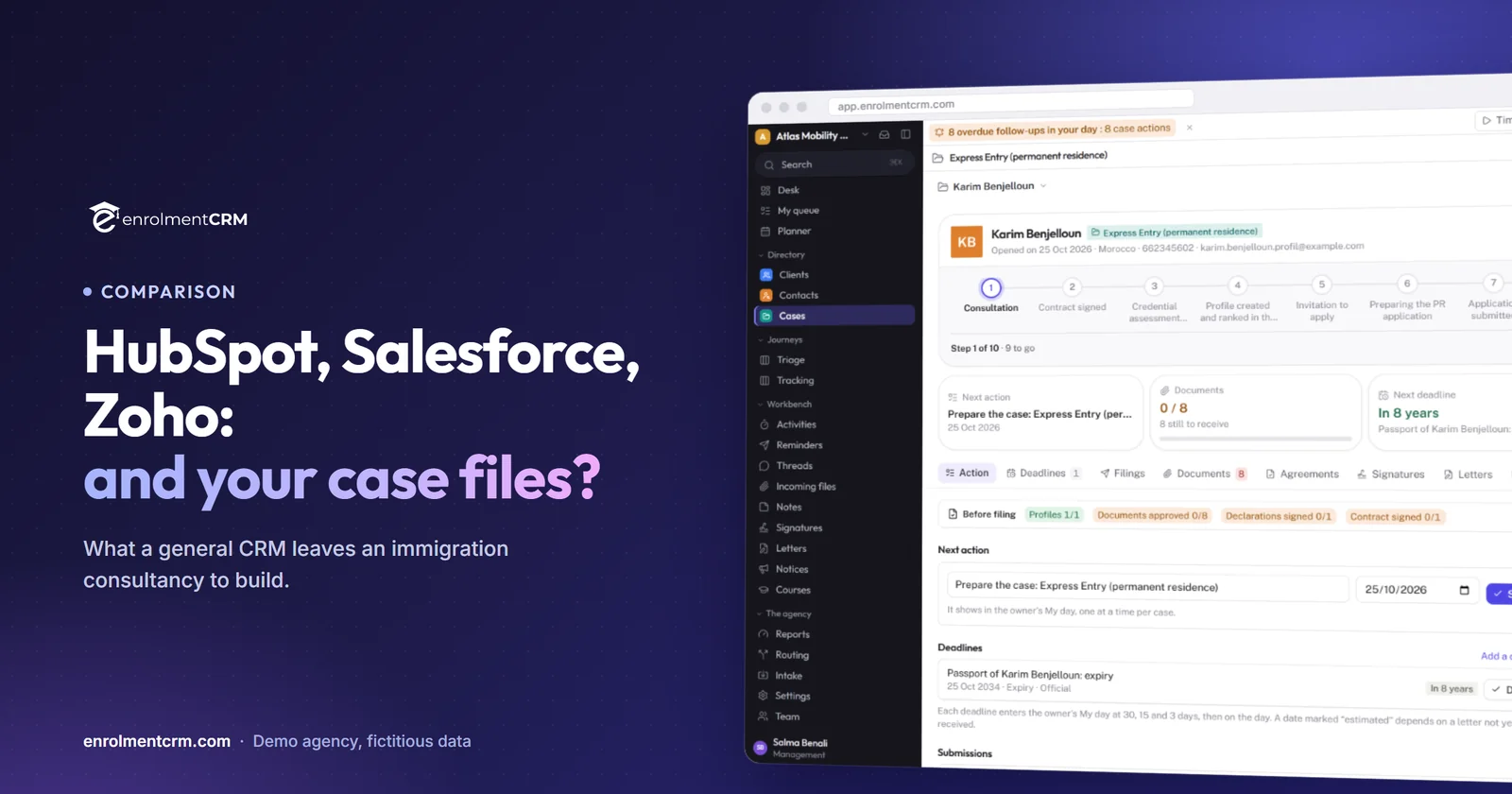
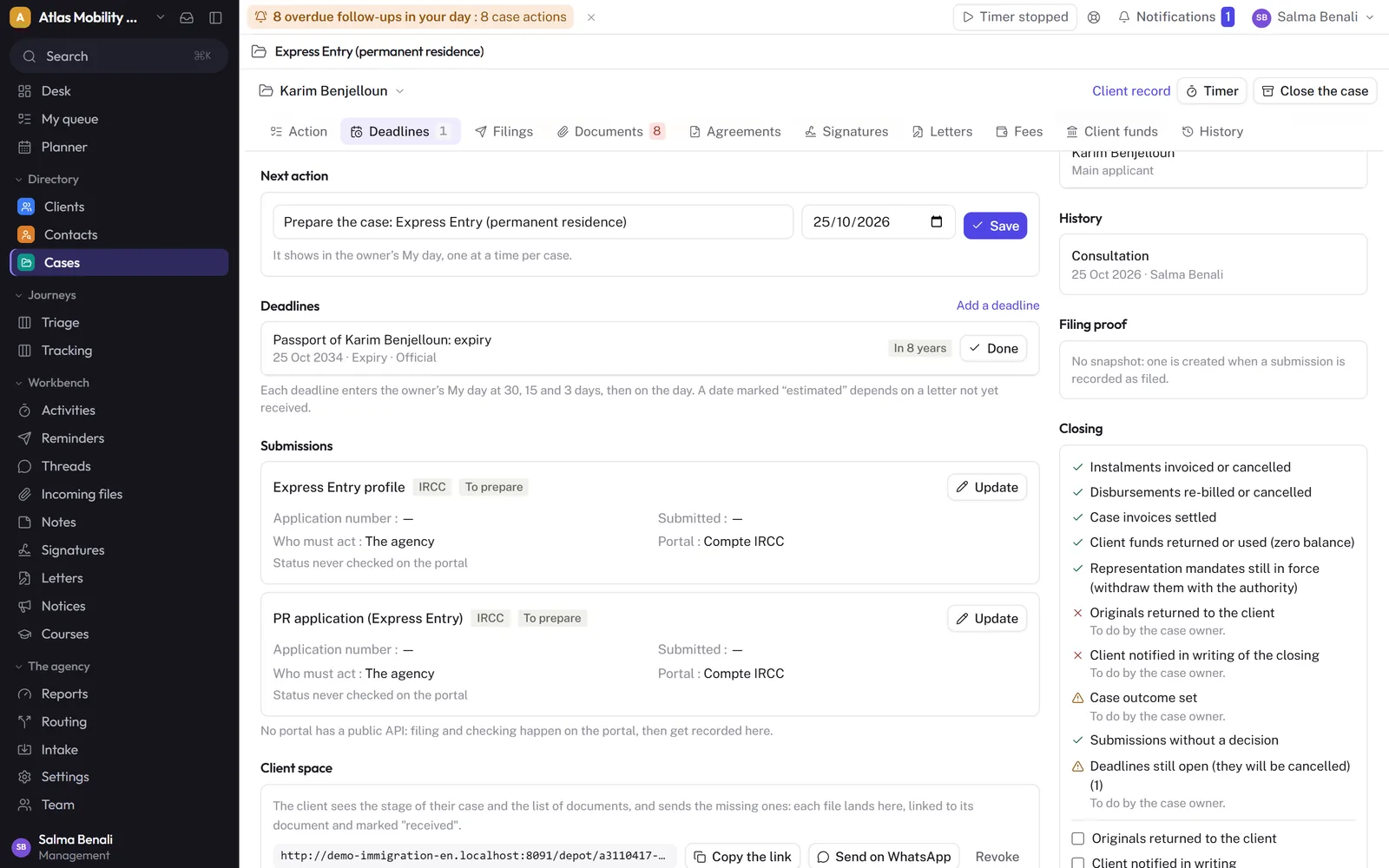
In enrolmentCRM, a file cannot move to another stage without a signed service agreement when the procedure requires one, and the “Before filing” block counts what is still missing: complete profiles, ready forms, approved documents, signed declarations. It is exactly the kind of rule you would have to write yourself elsewhere.
Fees follow the procedure too: one instalment when the file opens, another at submission, government fees on their own lines, the invoice and online payment, and the counsellor’s commission calculated automatically.
The bottom line
HubSpot, Salesforce and Zoho are excellent sales CRMs. For an immigration consultancy, they provide the contact database and the marketing, and leave you to build everything else: case files, procedures, documents, client space, forms, fees. If you have the team and the budget for that project, it is a defensible choice. If not, a CRM built for agencies gives you that domain knowledge from day one.
Further reading: immigration case management software compared, or Excel, Airtable or a CRM: when to switch.
Sources
- HubSpot, Sales Hub pricing, consulted on 25 October 2026.
- Salesforce, Sales Cloud pricing, consulted on 25 October 2026.
- Zoho, Zoho CRM pricing, consulted on 25 October 2026.
Frequently asked questions
Can HubSpot be used by an immigration consultancy?
Yes, many agencies use it for marketing and lead capture. Everything specific to immigration (procedures and stages, document lists, deadlines, client uploads, official forms) has to be configured with custom objects, properties and workflows, depending on the plan.
Is Salesforce too big for a small agency?
Salesforce can model almost anything, which is its strength and its cost: the editions beyond Starter are billed annually, and an immigration workflow usually means an implementation partner. For a team of five to twenty, that is a lot of set-up before the first file.
What does a specialist immigration CRM add?
Ready-made procedures with their stages, documents and timelines, a client space where clients upload documents from their phone, letters and e-signature, fees and commissions per file, and forms pre-filled from the client’s profile. In enrolmentCRM, these come configured from day one.
Can I keep HubSpot for marketing and use a specialist CRM for files?
You can, but you then maintain two contact databases and a sync between them. Most small and mid-size agencies prefer one tool where the lead becomes the client and the client becomes the file.